

Ford™
Ford™ App Info
-
App Name
Ford™
-
Package Name
com.ford.fordpass
-
Developer
Ford Motor Co. -
Category
Lifestyle -
Updated
2026/09/21
-
Version
6.23.0
Ford™ App Usage Overview
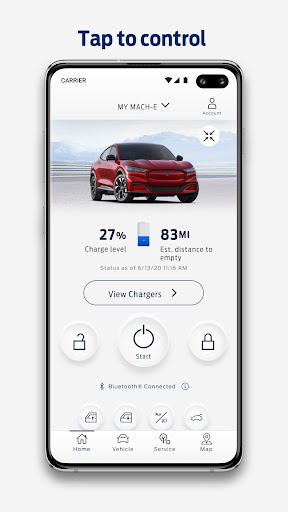
🚗 With the Ford app, you can manage your Ford journey in one place, including remote start, lock and unlock, vehicle stats, and GPS tracking.
📱 The app brings key controls to your phone, so you can check fuel or range status, view vehicle information, and use Phone As A Key with a tap.
🗓️ You can also schedule maintenance by choosing your preferred dealer, helping you keep your vehicle performing smoothly year-round.
⚡ If you drive an electric Ford, you can review charge levels, precondition your vehicle, and find public charging info inside the same app.
🔌 For connected experiences, you can activate available trials, purchase plans, and manage services such as BlueCruise and security-related packages.
📍 GPS tracking helps you stay aware of your vehicle location, so you can reduce stress and improve planning.
🛠️ Regular app updates add new features and important information, while over-the-air software updates let you plan updates in advance.
⌚ With Wear OS smartwatches, you can send commands and check vehicle status right from your wrist, improving workflow for busy drivers.
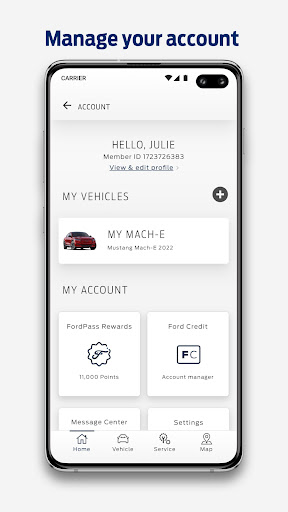
💳 Ford Rewards can help you redeem points for Ford service, accessories, and eligible connected services, potentially supporting ongoing ownership costs.
ℹ️ Important notes apply: remote features require an activated vehicle modem and the Ford app, functionality can vary by model, and Ford Rewards points require an activated account.
📶 The app is compatible with select smartphone platforms, and message and data rates may apply as outlined by the service provider.
- Remote features: remote start, lock and unlock, and additional controls.
- Vehicle management: fuel/range status, vehicle stats, and Phone As A Key.
- Scheduling service: select a dealer and book maintenance.
- Electric vehicle features: charge levels, preconditioning, and public charging info.
- Connected services: manage trials and purchases such as BlueCruise, connectivity, and security packages.
- GPS location: track your vehicle location in the app.
- App updates: updated regularly for new features and information.
- Ford Rewards: redeem points for eligible Ford service and accessories.
- Over-the-air updates: schedule software updates from the app or the vehicle.
- Wear OS support: send commands and check status from a smartwatch.
Pros of Ford™ App
✅ Centralized vehicle control reduces friction by combining remote features, vehicle stats, GPS tracking, and scheduling in a single app.
💡 Enterprise-grade convenience shows up in connected services management, helping owners activate plans, manage services, and stay informed about trial offers.
🔋 Electric vehicle drivers benefit from dedicated EV tools, including charge checks, preconditioning, and public charging information in one place.
Cons of Ford™ App
⚠️ Remote features depend on an activated vehicle modem and app setup, so some users may face limitations if activation is missing or incomplete.
📶 Cellular and vehicle capabilities can affect performance, meaning remote controls and connectivity may be limited or unavailable under certain conditions.
🧾 Ford Rewards redemption has eligibility rules, point limitations, and terms, so users focused on subscriptions or payments should review program details first.
Summary
🧠 The Ford app feels like a practical ownership platform rather than just a gadget, especially for drivers who want one interface for control, scheduling, and updates.
🚀 Remote actions, GPS visibility, and Phone As A Key make day-to-day use simpler, and the smartwatch support adds a modern layer of convenience.
🔧 From a service perspective, maintenance scheduling and over-the-air update planning help you manage time and reduce last-minute surprises.
⚡ For EV owners, the charge and preconditioning tools are especially valuable, supporting smoother routines and more predictable travel planning.
💰 The rewards layer adds a financial-ownership angle, but it works best when you understand the terms, eligibility, and redemption constraints.
🏢 Overall, it’s a strong app for connected car management, with enough services and updates to justify attention for anyone exploring automotive subscriptions or service plans.
How to Download the Ford™ App
⬇️ You can download the Ford app from our website, then install it on your compatible smartphone.
🔐 After installation, follow the in-app steps to set up your vehicle connection so remote features, tracking, and connected services can work correctly.
📲 Once set, you can sign in, manage services, and review Ford Rewards if you want to redeem points for eligible Ford service and accessories.
🧾 Be sure to review disclaimer information, including availability on select platforms and potential message and data rates.
Ford™
Version 6.23.0 Updated 2026/09/21


