

FitCloudPro
FitCloudPro App Info
-
App Name
FitCloudPro
-
Package Name
com.topstep.fitcloudpro
-
Developer
topstep -
Category
Health & Fitness -
Updated
2026/10/12
-
Version
2.6.4-2610081645
FitCloudPro App Usage Overview
💼 FitCloudPro is a smartwatch companion designed for smart connectivity, helping you manage device functions from your mobile phone with more control.
⚡ It pairs your KUMI smartwatch through Bluetooth and uses in-app permissions for timely notifications, synced health metrics, and smoother day-to-day tracking.
🔔 Once connected, the app focuses on real-world features like message alerts, call handling, and quick replies, which can support productivity and reduce missed communications.
📍 The app requests location access and Bluetooth permission to keep the connection stable and deliver on-time alerts while you move around your day.
📲 It also uses contacts and call-related permissions so you can manage call reminders and quickly identify important interactions.
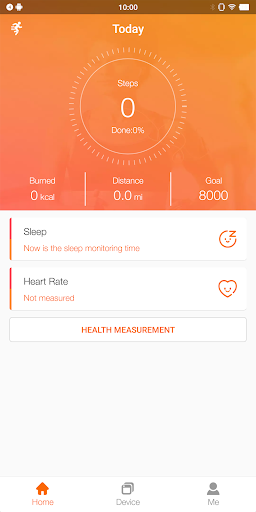
🧠 For health outcomes and analytics, it records steps, calories, sleep patterns, heart rate, and blood oxygen to give you a clearer view of daily trends.
📈 The fitness data flow is designed around background operation, so health sync can stay consistent even when the phone is less active.
🔋 To improve reliability, it may request battery optimization adjustments and allow apps to run in the background for steadier notification delivery and syncing.
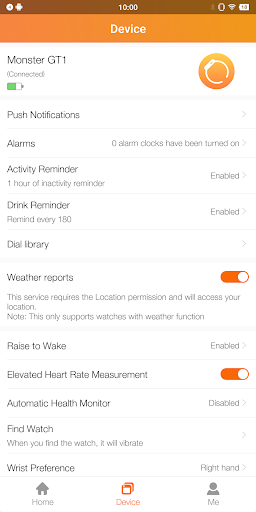
🔕 You can configure behaviors such as do not disturb, plus brightness and vibration settings, so alerts match your environment without extra friction.
🧾 Keep in mind: FitCloudPro is intended for general fitness and health awareness, not medical diagnosis or treatment.
Pros of FitCloudPro App
✅ 1. Reliable health dashboard for subscription-style consistency: it tracks steps, calories, sleep, heart rate, and blood oxygen to support long-term routine building.
🫀 2. Smart notification management that feels enterprise-ready: calls, SMS, and social reminders like Facebook and Twitter help you stay responsive without constantly checking your phone.
💬 3. Customization that supports personal workflows: dial selection, quick text replies, sedentary and hydration reminders help you tailor the experience to your schedule.
💡 Beyond basic monitoring, the app’s configuration options and notification controls can reduce cognitive load for busy users who value efficiency.
🔐 Permission-aware design helps deliver timely notifications, while background syncing supports a smoother user experience with fewer gaps.
Cons of FitCloudPro App
⚠️ 1. Permission requirements can feel heavy: location, contacts, call and message access, and notification permissions may worry privacy-conscious users.
📶 2. Performance depends on background settings: if battery optimization restrictions are not adjusted, notification timing and health sync may become less dependable.
⏳ 3. Feature depth is tied to supported models: FitCloudPro is built for specific KUMI watches, so users with other brands may not get the same integration.
🧩 Users also may need time to find the best alert, dial, and reminder configurations for their habits.
🗒️ Finally, the app’s focus on general wellness means it won’t replace medical tools or clinician guidance for health concerns.
Summary
🏁 FitCloudPro delivers a practical smartwatch control layer with health tracking, messaging reminders, and customizable watch faces that can make daily routines easier.
📲 From a “connected services” perspective, the app’s use of Bluetooth and notification permissions aims to keep data and alerts timely, which is essential for real usage.
🎯 For people who value structured habits, the health metrics and reminder system feel like a smart companion rather than a basic utility.
🔎 Still, the permission set and background optimization requests are a trade-off, so it’s worth reviewing what you enable based on your comfort level.
💙 Overall, FitCloudPro stands out as a well-rounded companion for supported KUMI models, especially for users who want dependable reminders and consistent health syncing.
How to Download the FitCloudPro App
⬇️ You can download FitCloudPro from our website, then follow the on-screen steps to install it on your mobile phone.
📱 After installation, open the app, connect your KUMI GT6 Pro, GW16T Pro, KU3 Max, or KU3 Meta smartwatch, and complete the permission prompts for best results.
🔗 Once paired, enable notifications and allow background operation where needed so the app can deliver alerts and sync health data consistently.
🧾 If you adjust settings later, revisit your notification and battery optimization options to keep performance stable.
✅ With the right setup, FitCloudPro can help you monitor daily health signals and stay on top of calls and messages without constant manual checking.
FitCloudPro
Version 2.6.4-2610081645 Updated 2026/10/12


